
start here · 01
What Godel Terminal shows you that your broker app doesn't
Every research session I ran before this tool started the same way: open the broker app, stare at a price and a headline, then fan out across six other websites for everything the app wasn't telling me. EDGAR for the filings. WhaleWisdom for who owns the stock. TradingView for a chart worth reading. By the eighth tab I'd usually forgotten what question I was trying to answer.
Godel Terminal collapsed all of that into one browser tab for me, and this page is what I'd tell a friend who asked what the thing is. A warning about the rest of the internet on this subject: most of what's written about this product is either a press release or a discount-code farm. This site earns a commission too — disclosed at the bottom of every page — but I use the terminal every day, and I'd rather show you what it does and let you decide.
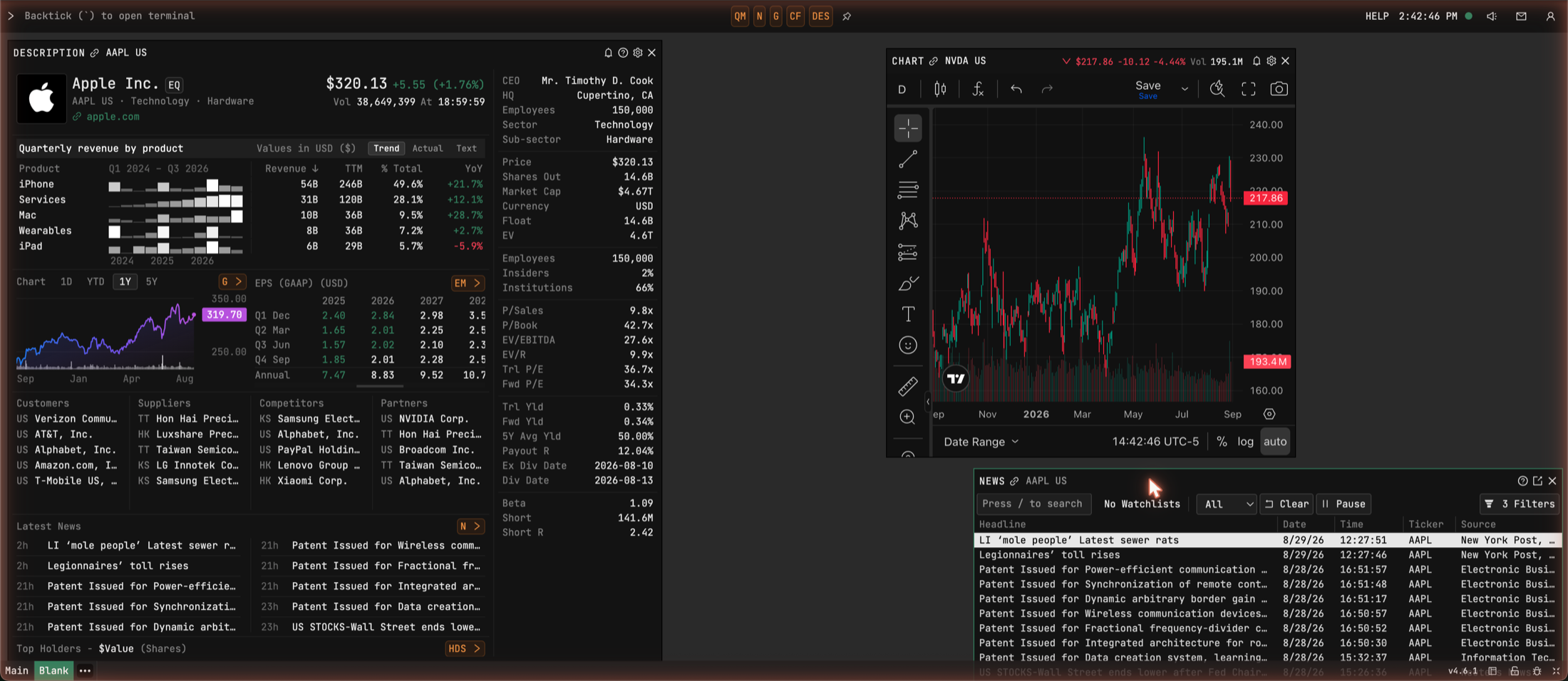
That's my working screen, one browser tab. The left panel is a company overview — what the company sells broken out by segment revenue, how the market values it, who owns it. Top right is a live chart. Underneath runs a news wire that updates as stories cross, every line stamped to the second.
Before any of that sounds appealing, two things it doesn't do, because they disqualify people. The terminal is not a broker — you can't place a trade with it. And there's no mobile app. It's a desktop product for sitting down and doing research, and if your investing life happens on your phone in checkout lines, this whole category of software is wrong for you. No guide on this site will change that.
What your broker app leaves out
A broker app gives you prices, headlines, and last year's financials, because its job is taking your orders. What it leaves out is the layer underneath: filings the minute they hit the SEC's servers, the institutional ownership table and what changed in it last quarter, every listing beyond the few thousand famous US names, and what the options market is pricing in.
None of that is hidden information. All of it is public, scattered across EDGAR, WhaleWisdom, TradingView, Yahoo, and your broker's own options page. The terminal's whole job is putting that layer on one screen and keeping every piece of it current. That's the product. Whether it's worth $118 a month depends on how often you need the layer, which is what the rest of this page is about.
The wire doesn't wait for your feed
The thing that changed how I read market news is simple to state: information exists before your feed writes a story about it. Minutes earlier on a normal day. Hours on a busy one. Filings land in the terminal the moment they land at the SEC, and the wire carries Reuters, Dow Jones, AP and a few dozen others, with breaking news painted across the screen as a red banner no matter what you're doing.

While I was capturing screenshots for these guides — a Saturday afternoon, market closed — that banner fired: IRAN DEPUTY FOREIGN MINISTER SAYS NOT IN A HURRY TO REOPEN STRAIT OF HORMUZ, stamped 2:40:06 PM. I read it, thought about oil prices for a minute, and did nothing, because I had no position that cared. That's the shape of breaking news — most of it belongs to someone else. But the day a headline names something you own, the hours between the wire and your feed are the entire reason this category of tool exists, and there's no way to know in advance which day that will be.
Who owns your stock, and who just left
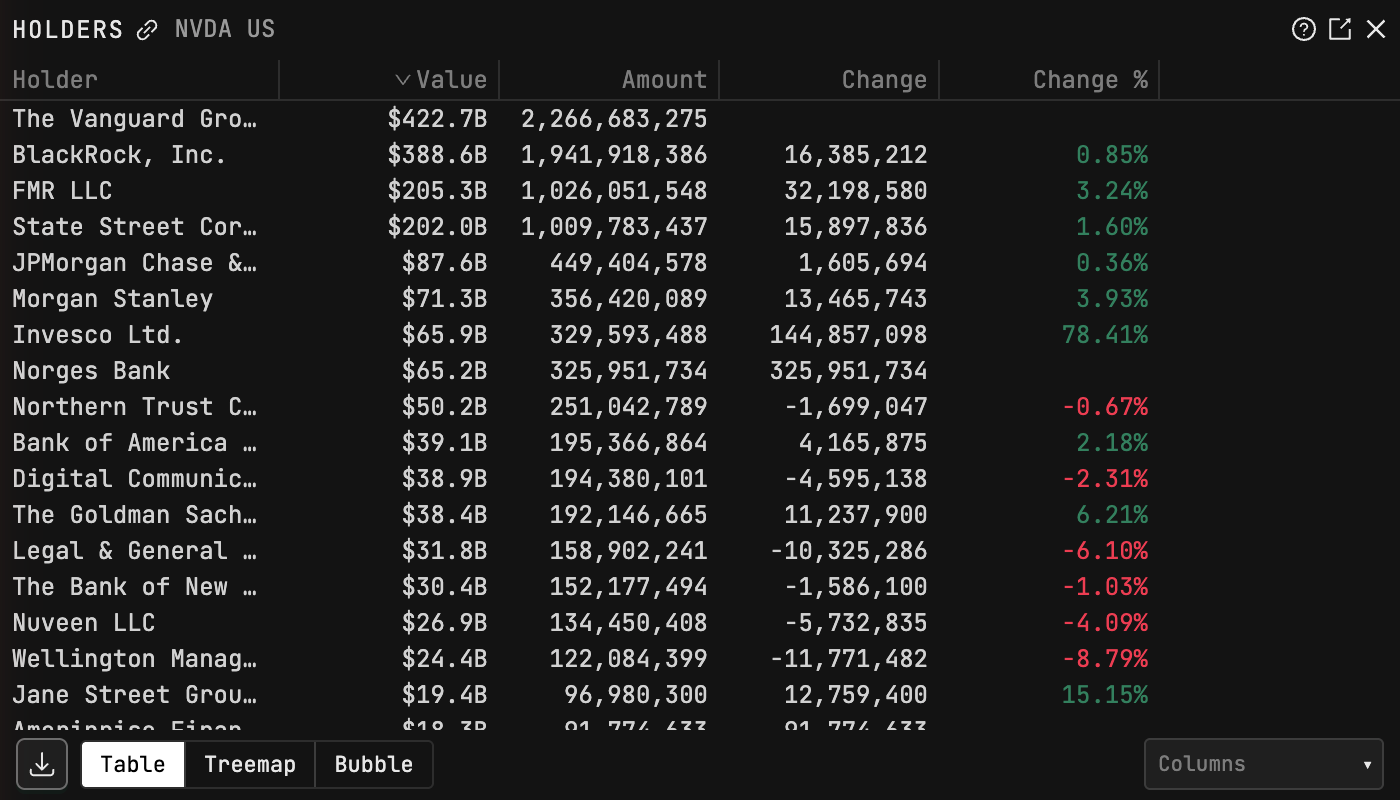
Pull up any stock you hold and the terminal shows a table of every institution in the name, built from their 13F filings: the fund, the size of the position, and — the column I read first — the change since last quarter. This matters more than it sounds like it does. A stock that two specialist funds hold in size and have added to for three straight quarters is in a different situation from one that a thousand index funds hold at exactly market weight because a formula put it there. You can work this out without a terminal; I used to, with WhaleWisdom and a lot of cross-referencing between tabs. In the terminal it takes about ten seconds.
The screener that knows every ticker on earth
My favorite party trick in the terminal's screener: sort the whole universe by market cap. The top is what you'd guess — Nvidia, Apple, Microsoft. But scroll a little and Anthropic appears, a private company with a "P" badge on its ticker, parked among the giants. OpenAI shows up a few rows later, then SpaceX, then ByteDance.
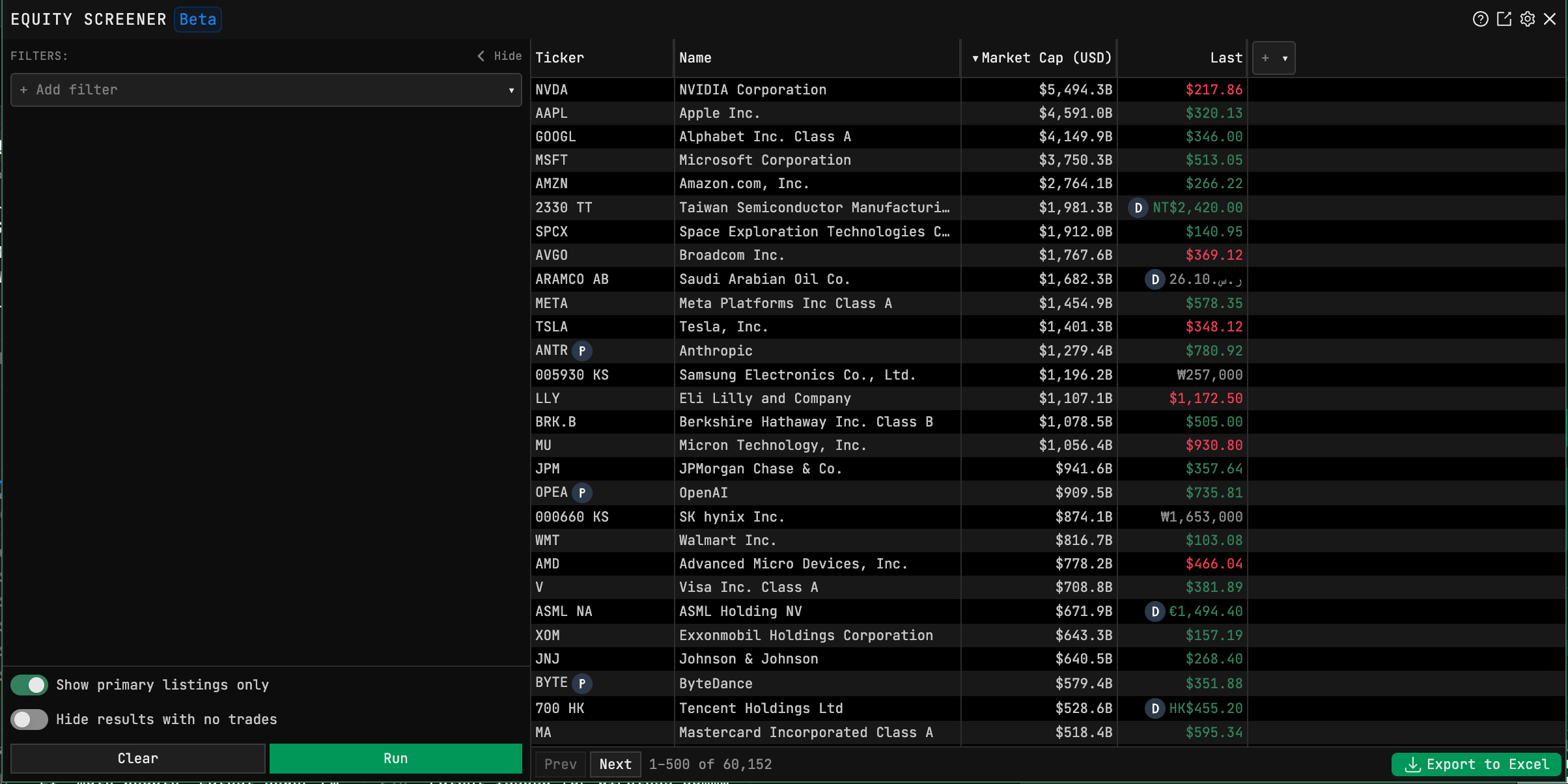
The private names are reference data — you can't buy them — but they tell you what kind of screener this is. The universe is about 60,000 listings (60,152 the day I verified this page; it drifts daily) across every major world venue, where a free screener covers a few thousand US names. Screens here come back with companies your other tools have never heard of. Whether that's useful depends on whether you ever look past the S&P 500. Plenty of people never do, and they're fine.
So do you need it
If you look at your account twice a month: no. Keep your app; even the free tier would sit unused. Where the terminal earns its keep is the day a name crosses your feed — a holding gaps down, a friend won't stop talking about some company — and you want the full picture while it still matters. Guide 03 is that exact workflow. It takes three minutes once you know it, it runs on the free tier, and running it tonight on a stock you already own will answer the question of whether you need any of this better than I can.